


|
Spam Hatası Alanlar Gir İçeri [Çözüldü]
|
|
ufufuk
Erbaş
01-20-2015, 06:34 PM,
#42
Gönderi
Erbaş
0
Rep
Evet Arkadaşlar sorunun çözümünü 30 dakka İçinde hallettim
 Bu "2" adımı deneyim bakalım Kesin Olucaktır [member_register aynı olabilir.]Admin-Kp-Temalar-Şablonlar-Şablonlar-Temanızın Templetesi- Üye Grup Şablonlar-Member-Register şablonuna girin ve bu kodla değiştirin Kod: <html>
<head>
<title>{$mybb->settings['bbname']} - {$lang->registration}</title>
{$headerinclude}
<script src="{$mybb->asset_url}/jscripts/validate/jquery.validate.min.js"></script>
</head>
<body>
{$header}
<form action="member.php" method="post" id="registration_form"><input type="text" style="visibility: hidden;" value="" name="regcheck1" /><input type="text" style="visibility: hidden;" value="true" name="regcheck2" />
{$regerrors}
<table border="0" cellspacing="{$theme['borderwidth']}" cellpadding="{$theme['tablespace']}" class="tborder">
<tr>
<td class="thead" colspan="2"><strong>{$lang->registration}</strong></td>
</tr>
<tr>
<td width="50%" class="trow1" valign="top">
<fieldset class="trow2">
<legend><strong>{$lang->account_details}</strong></legend>
<table cellspacing="0" cellpadding="{$theme['tablespace']}" width="100%">
<tr>
<td colspan="2"><span class="smalltext"><label for="username">{$lang->username}</label></span></td>
</tr>
<tr>
<td colspan="2"><input type="text" class="textbox" name="username" id="username" style="width: 100%" value="{$username}" /></td>
</tr>
{$passboxes}
<tr>
<td width="50%" valign="top"><span class="smalltext"><label for="email">{$lang->email}</label></span></td>
<td width="50%" valign="top"><span class="smalltext"><label for="email2">{$lang->confirm_email}</label></span></td>
</tr>
<tr>
<td width="50%" valign="top"><input type="text" class="textbox" name="email" id="email" style="width: 100%" maxlength="50" value="{$email}" /></td>
<td width="50%" valign="top"><input type="text" class="textbox" name="email2" id="email2" style="width: 100%" maxlength="50" value="{$email2}" /></td>
</tr>
<tr>
<td colspan="2" style="display: none;" id="email_status"> </td>
</tr>
{$hiddencaptcha}
</table>
</fieldset>
{$requiredfields}
{$customfields}
{$referrer}
{$regimage}
{$questionbox}
</td>
<td width="50%" class="trow1" valign="top">
<fieldset class="trow2">
<legend><strong>{$lang->account_prefs}</strong></legend>
<table cellspacing="0" cellpadding="{$theme['tablespace']}" width="100%">
<tr>
<td valign="top" width="1"><input type="checkbox" class="checkbox" name="allownotices" id="allownotices" value="1" {$allownoticescheck} /></td>
<td valign="top"><span class="smalltext"><label for="allownotices">{$lang->allow_notices}</label></span></td>
</tr>
<tr>
<td valign="top" width="1"><input type="checkbox" class="checkbox" name="hideemail" id="hideemail" value="1" {$hideemailcheck} /></td>
<td valign="top"><span class="smalltext"><label for="hideemail">{$lang->hide_email}</label></span></td>
</tr>
<tr>
<td valign="top" width="1"><input type="checkbox" class="checkbox" name="receivepms" id="receivepms" value="1" {$receivepmscheck} /></td>
<td valign="top"><span class="smalltext"><label for="receivepms">{$lang->receive_pms}</label></span></td>
</tr>
<tr>
<td valign="top" width="1"><input type="checkbox" class="checkbox" name="pmnotice" id="pmnotice" value="1"{$pmnoticecheck} /></td>
<td valign="top"><span class="smalltext"><label for="pmnotice">{$lang->pm_notice}</label></span></td>
</tr>
<tr>
<td valign="top" width="1"><input type="checkbox" class="checkbox" name="pmnotify" id="pmnotify" value="1" {$pmnotifycheck} /></td>
<td valign="top"><span class="smalltext"><label for="pmnotify">{$lang->email_notify_newpm}</label></span></td>
</tr>
<tr>
<td valign="top" width="1"><input type="checkbox" class="checkbox" name="invisible" id="invisible" value="1" {$invisiblecheck} /></td>
<td valign="top"><span class="smalltext"><label for="invisible">{$lang->invisible_mode}</label></span></td>
</tr>
<tr>
<td colspan="2"><span class="smalltext"><label for="subscriptionmethod">{$lang->subscription_method}</label></span></td>
</tr>
<tr>
<td colspan="2">
<select name="subscriptionmethod" id="subscriptionmethod">
<option value="0" {$no_auto_subscribe_selected}>{$lang->no_auto_subscribe}</option>
<option value="1" {$no_subscribe_selected}>{$lang->no_subscribe}</option>
<option value="2" {$instant_email_subscribe_selected}>{$lang->instant_email_subscribe}</option>
<option value="3" {$instant_pm_subscribe_selected}>{$lang->instant_pm_subscribe}</option>
</select>
</td>
</tr>
</table>
</fieldset>
<br />
<fieldset class="trow2">
<legend><strong><label for="timezone">{$lang->time_offset}</label></strong></legend>
<table cellspacing="0" cellpadding="{$theme['tablespace']}" width="100%">
<tr>
<td><span class="smalltext">{$lang->time_offset_desc}</span></td>
</tr>
<tr>
<td>{$tzselect}</td>
</tr>
<tr>
<td><span class="smalltext">{$lang->dst_correction}</span></td>
</tr>
<tr>
<td>
<select name="dstcorrection">
<option value="2" {$dst_auto_selected}>{$lang->dst_correction_auto}</option>
<option value="1" {$dst_enabled_selected}>{$lang->dst_correction_enabled}</option>
<option value="0" {$dst_disabled_selected}>{$lang->dst_correction_disabled}</option>
</select>
</td>
</tr>
</table>
</fieldset>
{$boardlanguage}
</td>
</tr>
</table>
<br />
<div align="center">
<input type="hidden" name="regtime" value="{$time}" />
<input type="hidden" name="step" value="registration" />
<input type="hidden" name="action" value="do_register" />
<input type="submit" class="button" name="regsubmit" value="{$lang->submit_registration}" />
</div>
</form>
<script type="text/javascript">
<!--
$().ready(function() {
// validate registration_form
$("#registration_form").validate({
rules: {
username: {
required: true,
minlength: {$mybb->settings['minnamelength']},
maxlength: {$mybb->settings['maxnamelength']},
remote:{
url: "xmlhttp.php?action=username_availability",
type: "post",
dataType: "json",
data:
{
my_post_key: my_post_key
},
},
},
email: {
required: true,
email: true,
},
email2: {
required: true,
email: true,
equalTo: "#email"
},
},
messages: {
username: {
minlength: "{$lang->js_validator_username_length}",
maxlength: "{$lang->js_validator_username_length}",
},
email: "{$lang->js_validator_invalid_email}",
email2: "{$lang->js_validator_email_match}",
}
});
{$validator_extra}
});
// -->
</script>
{$footer}
</body>
</html>Kod: Şimdi 2. Adımdaki resimleri Uygulayın;
Admin-Kp-Forum Ayarları-Kullanıcı Giriş ve Kayıt Ayarları;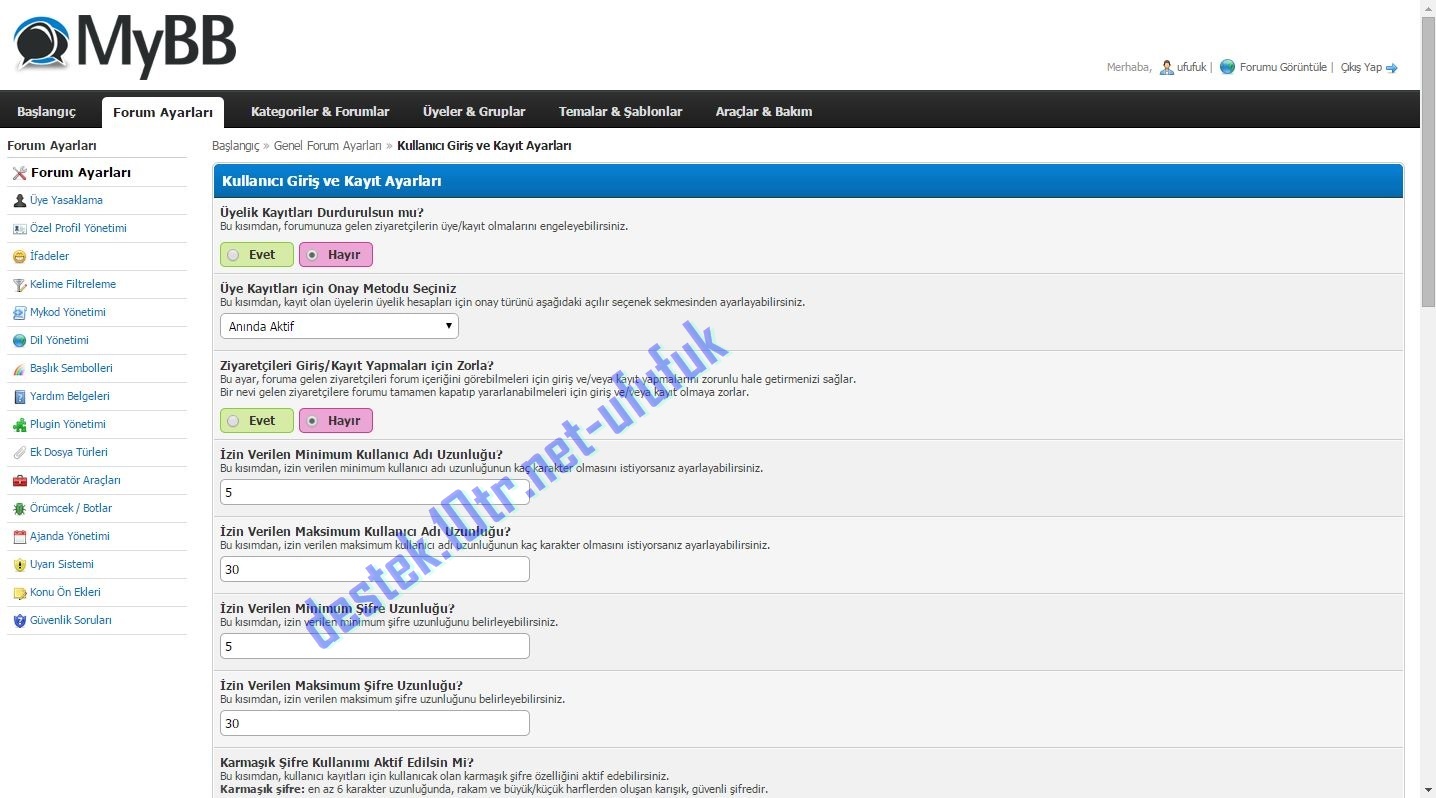    Resimler benden alıntıdır 
1
#42
|
|
« Önceki Konu | Sonraki Konu »
|
Şu anda bu konuyu okuyanlar: 1 Ziyaretçi